
You did everything right. You scraped a high-quality lead list. You ran it through a standard email verifier. You got a green light—"Valid." You hit send.
Twenty-four hours later, your open rate is in the single digits, and your bounce rate is climbing past 5%. Your domain reputation is taking a hit, and you're left wondering: What happened? I verified these emails!
What is a catch-all domain
Welcome to the Catch-all Email Verification Conspiracy.
In the world of email marketing, "Valid" doesn't always mean "Exists." As we move into 2026, the mail servers run by Google, Microsoft, and Yahoo have built a fortress around the inbox. If you are still relying on basic SMTP checks, you aren't just flying blind—you're flying directly into a storm.
At SanitizeMail.com, we don't just "ping" servers; we verify accept-all emails and understand the deep architecture of the inbox. Today, we're going to tear down the "Black Box" of email verification and show you exactly how powerful SMTP logic works, why catch-all domains are destroying your campaigns, and how "Glass Box" transparency can save your sender reputation.
The "250 OK" Lie: Understanding the Catch-All
To understand why your emails bounce, you have to understand how servers talk to each other. When a verifier checks an email, it performs a "Secret Handshake" with the receiving server. This is defined by a set of internet rules called RFC 5321.
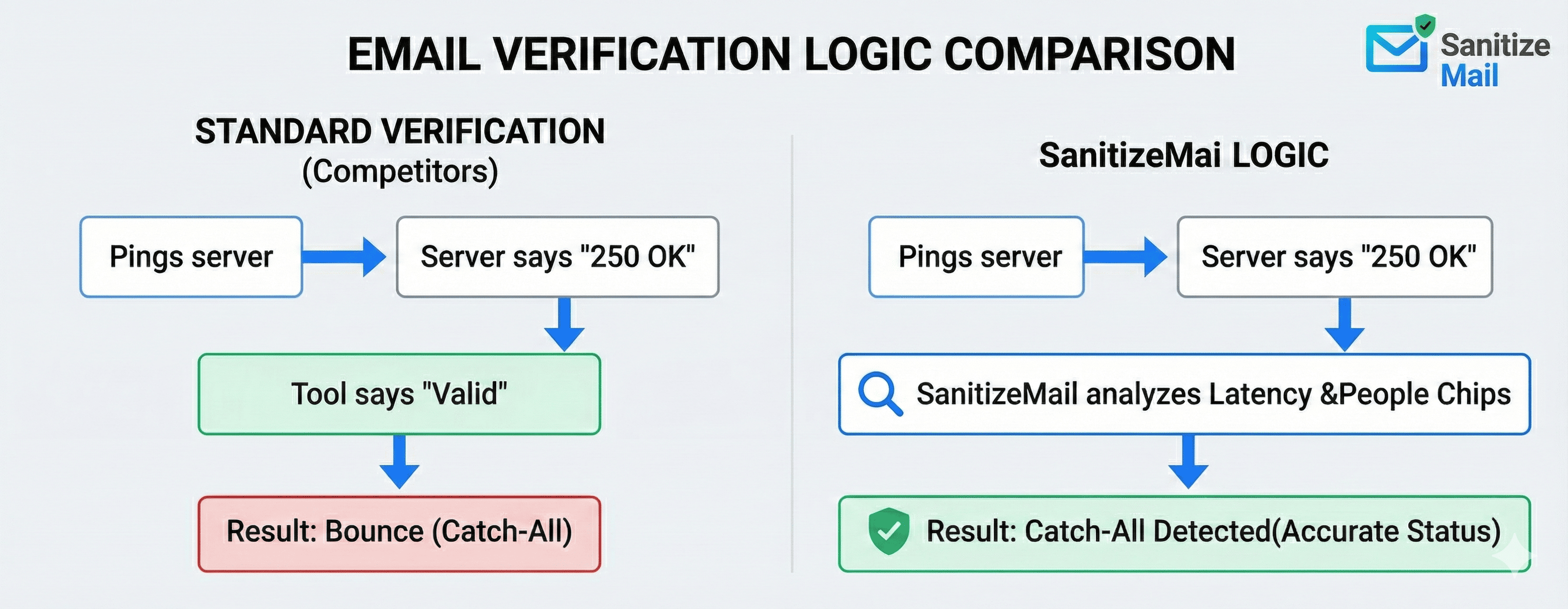
Here is how a standard verification works:
Verifier: "Hello, I have mail for john@company.com."
Server: "Let me check... Yes, john is here. Code 250 OK."
Verifier: "Great, thanks!" (Disconnects).
This works for 60% of emails. But the other 40% are Catch-All Domains (also known as "Accept-All").
The Receptionist Metaphor
Imagine you walk into a giant corporate office building and ask the receptionist, "Is John Doe here?"
Standard Domain: The receptionist checks the directory. "No, no John here." (Code 550 - Invalid).
Catch-All Domain: The receptionist has been ordered to say "Yes" to everyone to protect privacy. You ask for "John Doe," they say "Yes." You ask for "Spiderman," they say "Yes." You ask for "fhqwhgads," they say "Yes".2
The server responds with 250 OK to every request. A basic verifier sees this 250 code and marks the email as Valid. You send your campaign, the server accepts the email, realizes "Spiderman" doesn't work there, and silently deletes it or sends a delayed bounce notification hours later.
The Result: You paid for a "Valid" email, but you bought a bounce.
Beyond the Basics: Powerful SMTP Logic
SMTP handshake verification explained:
So, if the server lies, how do we find the truth? This is where Powerful SMTP Logic comes in. It distinguishes enterprise-grade tools like SanitizeMail from the free scripts you find on forums.
We use advanced heuristics—essentially "detective work"—to bypass the receptionist and find out if John is actually at his desk.
1. The "Gibberish" Control Test
The first step in powerful verification is to identify if a domain is lying. We do this by sending a probe for a user that mathematically cannot exist, such as 834jdf83_nonexistent@targetdomain.com.
If the server says "User Unknown" (550), it's a standard domain. We can trust its answers.
If the server says "OK" (250), we know it's a Catch-All. We immediately switch to Advanced Mode.3
2. Latency Analysis (The Timing Side-Channel)
This is 2026-level tech. Even when a server lies and says "OK," it takes a different amount of time to process a real user versus a fake user.
Real User: The server has to check its internal database, look up storage quotas, and route the path. Let's say this takes $50ms$.
Fake User: The server checks the database, finds nothing, and defaults to the "Catch-All bucket." This might take $10ms$ or $100ms$ depending on the software.
By measuring these micro-second differences—a technique known as Side-Channel Analysis—we can statistically predict if a user exists even inside a Catch-All domain to reduce email bounce rate B2B.
3. "Glass Box" vs. "Black Box" Verification
Most verifiers operate as a "Black Box email verification." You feed them a list, they give you a status, and you have no idea why.
Black Box Email Verification: "Status: Risky." (Why? Who knows.)
Glass Box Email Verification: "Status: Catch-All. Reason: Server accepts all commands, but SMTP response time matched valid user profile. Safe to Send."
In 2026, transparency is everything. You need to know why an email is marked risky so you can decide whether to take the shot.
The "App-User" Loophole (People Chips)
Sometimes, the SMTP door is locked tight. Microsoft Office 365 and Google Workspace are becoming notoriously difficult to probe using standard methods. Microsoft is even deprecating basic authentication for SMTP in 2026, making old-school scripts obsolete.
When the front door is locked, we check the windows.
Advanced verification uses Out-of-Band (OOB) checks. We don't ask the email server; we ask the ecosystem around it.
The Logic: If john@company.com is a valid email, John probably has a registered account on the company's productivity suite (Teams, Slack, Google Drive).
The Method: We simulate a request to these services (like adding a "People Chip" in a collaborative tool). If the service returns a profile photo or a "User Found" signal, we know the email is valid with 100% certainty, regardless of what the Catch-All server says.3
This method is computationally expensive, but it is the "Nuclear Option" for verifying high-value B2B leads that others mark as "Unknown."
The Greylisting Hurdle: Why Patience Pays Off
Have you ever seen a status like 451 Temporary Error? This is Greylisting.8
To stop spammers, firewalls often reject the first attempt from any new IP address, telling them to "come back later."
Spammers: They are in a hurry. They never come back.
SanitizeMail: We are patient.
Our logic includes Anti-Greylisting protocols. When we hit a 451 or 421 error, we don't mark the email as invalid. We pause, wait for the calculated back-off period (often 15 minutes), and retry. This single step can recover 10-15% of "Invalid" emails that are actually perfectly good leads.
The SanitizeMail Strategy: A Waterfall Approach
We don't just scrub your list; we sanitize it. Here is the strategy we recommend for all our clients dealing with Catch-all email verification lists:
1. The Traffic Light Segmentation
Don't delete your Catch-Alls! They often make up 30-50% of your list. Instead, segment them.
🟢 Green (Valid): Verified via SMTP 250 OK or App-User Check. Action: Blast away.
🟡 Yellow (Risky/Catch-All): The server is Catch-All, but our Latency/Heuristic score is high. Action: Drip feed these. Send 20-50 per day to monitor bounces. Do not blast.
🔴 Red (Invalid): Hard bounce (550), syntax error, or Spam Trap. Action: Burn it. Delete immediately.
2. The Enrichment Layer
If a Catch-All email is crucial (e.g., the CEO of a target account), use our enrichment data. If we can find a LinkedIn profile or a recent "Last Seen" date for that email, the probability of it being valid skyrockets.
3. Continuous Hygiene
List cleaning isn't a one-time event. B2B data decays at a rate of 22% per year. People change jobs; domains expire. Our system offers Real-Time API verification to check emails the moment they are typed into your signup forms, stopping typos and bots before they ever enter your database.
Conclusion: Stop Guessing, Start Sanitizing
The era of "Batch and Blast" is over. The "Catch-All" configuration is not a bug; it is a feature designed to protect organizations from spam. But with the right technology, it doesn't have to be a roadblock for your business.
At SanitizeMail.com, we use Powerful SMTP Logic—combining latency analysis, anti-greylisting, and app-user heuristics—to turn "Unknown" into "revenue."
Don't let a "250 OK" lie to you. Sanitize your list, protect your reputation, and ensure that when you hit send, your message actually lands.
Ready to see the difference Glass Box transparency makes? Best catch-all email verifier 2026 Try our bulk verification today.